
‘Comment’ has its own importance in software coding. This helps to understand the software code and its flow. The comment is always written in a simple and human-readable format. If a new person reads the code, then he can easily understand the purpose of the code with the help of comments. The LoadRunner script comment has the same objective.
Hence, it is always advisable to write a comment for every transaction or important step in the LoadRunner script.
You can add comments in two ways:
1. At the time of recording
While recording the script, click the ‘Insert Comment’ button to add a comment at the desired step. This option is less preferable because recording events is increased continuously, and due to the delay in writing the comment, they are misplaced. The alternate option is to write the comments when recording events are paused, i.e., in between two steps or transactions.
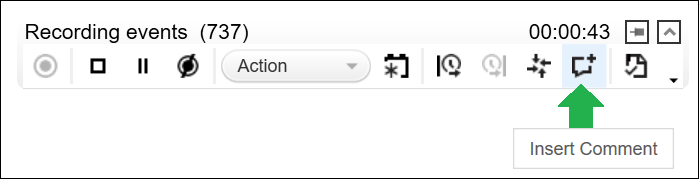
2. At the time of script editing
Once you complete all the modifications in the script like Parameterization, Correlation, etc., then manually add the comment in the script. LoadRunner follows C++ comment syntax.
- Single-line Comment
//Payment Gateway Flow Started- Multiline Comment
/*
web_add_cookie("NID=196=ZUqpVqxCXgX; DOMAIN=abc.com");
web_add_cookie("NID=196=ZUqpVqxCXgY; DOMAIN=abc.com");
web_add_cookie("NID=196=ZUqpVqxCXgZ; DOMAIN=abc.com");
*/
You may be interested: